What Happens When You Miss a Drupal Security Update
September 8, 2026 · By Dylan James
Introduction
Drupal runs well over a million sites, and a disproportionate number of them are the ones you would least want compromised: government portals, universities, hospitals, banks, NGOs, and the agencies that build for all of the above. That footprint makes Drupal a permanent target, and the Drupal Security Team responds with a disciplined, public disclosure process. Contributed project advisories go out on Wednesdays; core security releases land on a scheduled window, usually the third Wednesday of the month, and a highly critical release is often preceded by a Public Service Announcement (PSA) a few days ahead so teams can clear their calendars.
That predictability cuts both ways. The moment an advisory is published, the patch and the vulnerability details are public at the same time. Attackers reverse the fix, build automated scanners, and start spraying the internet. For the worst Drupal bugs, the gap between "advisory published" and "mass exploitation underway" has been measured in hours, not weeks.
Missing one of those windows is how every story below starts. This article walks through what has actually happened to organisations that fell behind, why staying current is harder than it sounds, what the typical manual update process looks like in practice, and how a central dashboard changes the maths.
When it goes wrong: four cautionary tales
Drupalgeddon - SA-CORE-2014-005 (CVE-2014-3704)
In October 2014 the Drupal Security Team disclosed a pre-authentication SQL injection flaw in Drupal 7's database API. It required no account, no social engineering, and no chained exploit - a single crafted request could run arbitrary SQL, which in turn meant creating admin accounts and executing PHP.
Automated attacks began within hours. The team's follow-up PSA was blunt: site owners should "proceed under the assumption that every Drupal 7 website was compromised unless updated or patched before Oct 15th, 11pm UTC, that is 7 hours after the announcement."
The detail that still catches teams out: many attackers installed a backdoor and then applied the official patch themselves, closing the door behind them so no rival could take the same server. If you updated a few days later and saw a clean version number, your site could still have been fully owned. The official guidance was to restore from a known-good backup or rebuild - updating alone was not remediation.
The Panama Papers - Mossack Fonseca (2016)
The Panama Papers leak exposed roughly 2.6 terabytes of data - about 11.5 million documents - from the Panamanian law firm Mossack Fonseca, and the fallout contributed to the firm shutting down in 2018.
Security researchers who examined the firm's public-facing systems afterwards reported that its client portal was running Drupal 7.23, a release from 2013 that had reportedly not been updated in roughly three years. That left it exposed to Drupalgeddon and a string of later fixed vulnerabilities. The firm's other systems had their own problems - an outdated email platform, a dated version of a slider plugin on the WordPress site - but the picture is consistent: a set of internet-facing applications that had simply stopped being maintained. An unpatched CMS was not the whole breach, but it was a documented part of the attack surface.
Drupalgeddon 2 - SA-CORE-2018-002 (CVE-2018-7600)
In March 2018 Drupal disclosed a pre-authentication remote code execution flaw affecting Drupal 7 and 8. It was serious enough to warrant a PSA in advance, and it affected an estimated one million-plus sites.
A working proof-of-concept became public roughly two weeks after the patch. Scanning and exploitation spiked immediately. The consequences played out in public:
- The Ukrainian Energy Ministry's website was compromised, defaced, and had ransomware deployed on it.
- More than 400 government and university websites - including the San Diego Zoo - were injected with the Coinhive script, silently mining Monero in visitors' browsers. One tracked cryptomining campaign built on the same bug is estimated to have earned around $11,000.
- Beyond miners, attackers used the hole to drop backdoor shells, add servers to botnets, and stage further attacks.
None of these were targeted operations against a specific victim. They were the internet-wide sweep that follows every high-severity Drupal advisory, catching whoever had not patched yet.
The REST RCE - SA-CORE-2019-003 (CVE-2019-6340)
Less than a year later, in February 2019, Drupal disclosed another highly critical remote code execution bug, this time reachable through the RESTful Web Services module and, under some configurations, triggerable with an unauthenticated GET request. Public exploit code and write-ups circulated within days of the advisory. Any Drupal 8 site with the REST module enabled and no patch applied was a candidate.
The slow-motion version: Drupal 7 end-of-life
Not every failure is a single dramatic bug. Drupal 7 reached end-of-life on 5 January 2025 (PSA-2025-01-06). Around that time, a large share of active Drupal sites - by various estimates close to 40% - were still on Drupal 7. After EOL there are no more core or contributed security advisories from the Drupal Security Team, packaging feeds are shut off, and third-party scanners start flagging the sites as insecure by default. Every vulnerability discovered from that point on is effectively permanent unless you pay for commercial extended support or finish a migration. "We'll deal with it later" quietly became "we are now running unsupported software in production."
Why "we'll get to it" is so expensive
The common thread in all of these is time. A patch existed. The window between the patch shipping and it being applied was the vulnerability. A few reasons that window is so costly:
- Disclosure equals a starting gun. Because the fix and the flaw are public together, "we'll schedule it for next month's maintenance" is a decision to stay exploitable during the exact period attackers are most active.
- Cleanup is not the same as patching. As Drupalgeddon showed, once a site is breached, bumping the version number does not remove a web shell, a rogue admin account, or a cron-based re-infection. Recovery means investigation and often a rebuild.
- Compliance assumes you patch. PCI DSS, GDPR, HIPAA and similar frameworks all expect known vulnerabilities to be remediated on a defined timeline. An unpatched, publicly disclosed CVE on a system holding cardholder or health data is not just a security problem, it is an audit finding.
- Reputation and SEO damage outlast the incident. A site caught serving malware or cryptomining scripts can be blocklisted by browsers and search engines, and clients remember the outage.
- Contributed module sprawl. A mid-size Drupal site can run dozens of contributed modules, each maintained by different people on different schedules, some no longer actively maintained at all. Core is the headline, but contrib is where a lot of the risk quietly accumulates - and it is much easier to lose track of.
The low-fi update process (what most teams actually do)
Most teams managing more than one Drupal site do not have tooling for this. They have a process, and it usually looks something like the following. Say you look after 15 sites.
- Keep a master list. A spreadsheet or wiki page with every site: name, URL, admin login location, hosting provider, current Drupal core version, and a rough list of key modules.
- Pick a cadence and start clicking. Monthly, if you are disciplined. For each site, log in and open Reports → Available updates (
/admin/reports/updates). If you have shell access,drush pm:securityandcomposer outdated "drupal/*"get you the same information faster. - Record what you find. For each site: current core version, which modules have updates available, and - the part that matters - which of those updates are flagged as Security update rather than a routine release.
- Cross-check the advisories. Skim drupal.org/security for anything that applies to versions you are running, including modules the update report might not have flagged yet.
- Log it and assign it. Update the spreadsheet, set an owner and a target date per site, prioritising anything security-related.
- Do the work. Apply updates in staging, test, deploy to production, tick the row.
- Repeat next month. Between runs, you are relying on nothing critical being disclosed.
Here is roughly what the tracking spreadsheet looks like a couple of weeks into a cycle. It is illustrative, but if you have run this process you will recognise it:
| Site | URL | Drupal core | Core update? | Security advisory? | Modules needing update | Last checked | Owner | Status |
|---|---|---|---|---|---|---|---|---|
| Acme Corp | acme.example | 10.2.4 | 10.2.6 | Yes - SA-CORE | webform, token | 2026-08-04 | Priya | Scheduled 08-12 |
| City Libraries | libraries.example | 10.3.1 | - | No | metatag | 2026-08-04 | Sam | Done |
| Northside Clinic | clinic.example | 10.2.6 | - | No | - | 2026-08-05 | Sam | Done |
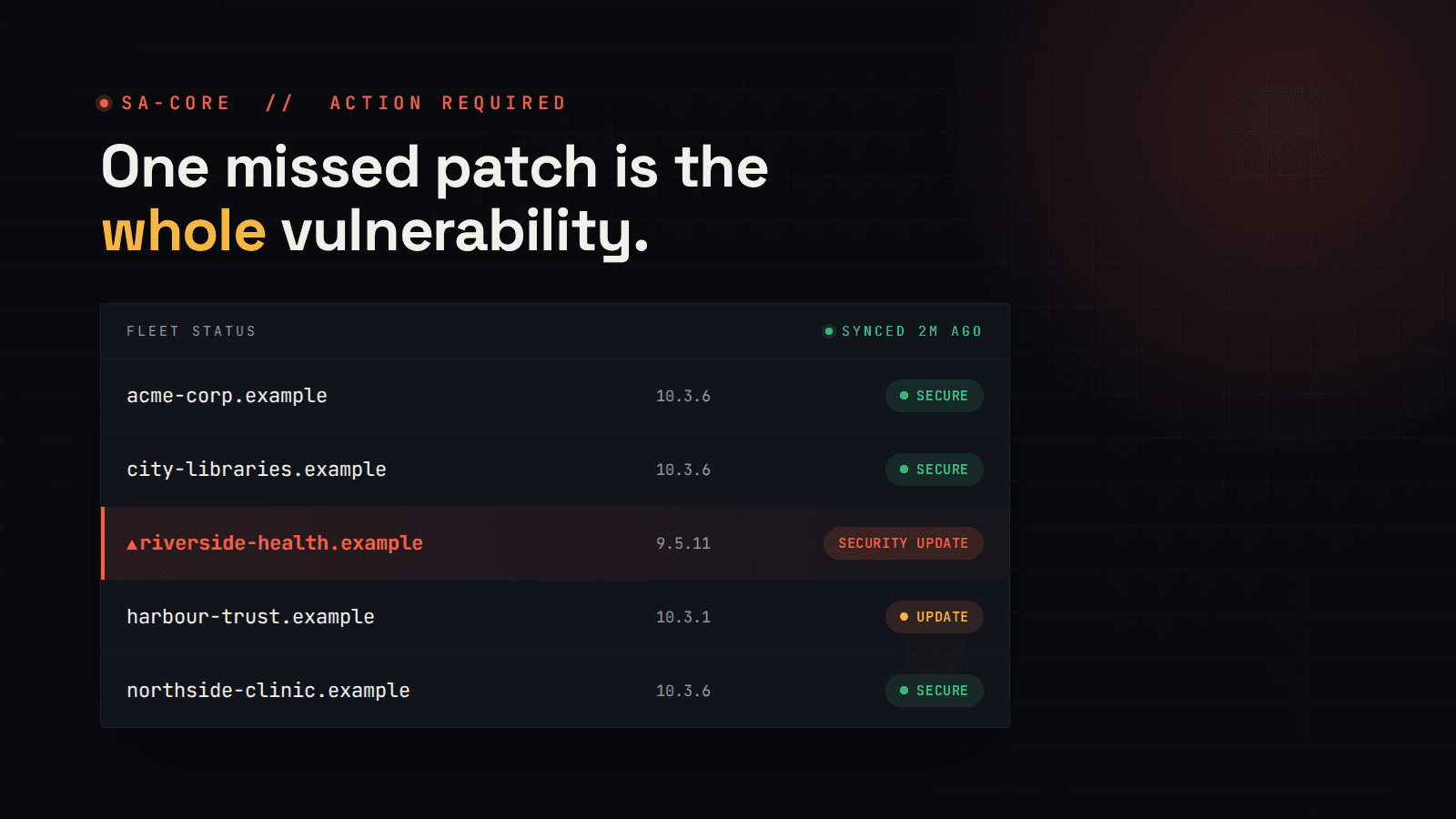
| Riverside Health | riverside.example | 9.5.11 | 10.x | Yes - unsupported branch | pathauto, admin_toolbar, +6 | 2026-06-18 | ? | Overdue |
| Harbour Trust | harbour.example | 10.1.8 | 10.3.x | Checking | ctools, views_bulk_ops | 2026-07-22 | Priya | Blocked - staging broken |
| ... 10 more rows |
Where this falls apart
- It is stale the moment you save it. The spreadsheet is a snapshot of one afternoon. An advisory published the next morning does not update the "Security advisory?" column - a human has to notice, next cycle.
- There are no alerts between checks. If a highly critical core release drops on day 3 of a 30-day cycle, your process finds out on day 30. The Drupalgeddon stories are what "day 30" can look like.
- Credential and MFA friction. Logging into 15 admin panels, each with its own password manager entry and 2FA prompt, is enough overhead that "quick checks" quietly stop happening.
- Human error. Version numbers get transcribed wrong, rows get missed, a site added six months ago never made it onto the list. The "Riverside Health" row above - owner "?", last checked in June, on an unsupported branch - is exactly the kind of gap these tables accumulate.
- It does not scale. The process that is merely tedious at 15 sites is unworkable at 40, so it gets done quarterly, then "when we remember."
- No real audit trail. When a client or an auditor asks "when did you know site X was vulnerable, and when did you fix it?", a spreadsheet that gets overwritten each cycle cannot answer.
The Fleetview way
Fleetview does the same job - know the update and security status of every site you manage - without the logging-in and the hand-maintained spreadsheet.
- Connect each site once. Install the
fleetview_clientmodule on each Drupal site and pair it with your Fleetview account. From then on, Fleetview pulls core, module and theme versions and their security-advisory status automatically, on a schedule you set per organisation (anywhere from every few minutes to weekly). - One dashboard for the whole fleet. Every site, every pending update, with security releases called out separately from routine ones. The "which of my sites need attention right now" question is answered on load, not after an afternoon of clicking.
- Alerts that fire between checks. When a site moves into a not-secure state, Fleetview emails you - you are not waiting for the next manual cycle to find out. Connection-error alerts tell you when a site stops reporting in, and an optional daily or weekly summary gives you a digest without logging in at all.
- A real history. Every sync is recorded, so "when did this site become vulnerable, and when was it resolved?" has an actual answer for clients and auditors.
- The rest of the health picture too. SSL certificate expiry and uptime sit in the same dashboard, so a single glance covers "is this fleet healthy?" rather than three separate tools.
The spreadsheet becomes a live dashboard, and "last checked" is always a few minutes ago instead of six weeks.
Conclusion
Every incident in this article has the same shape: a fix was available, and the time it took to apply it was the entire exposure. Drupalgeddon gave people about seven hours. Drupalgeddon 2 gave people a couple of weeks before the proof-of-concept, then no time at all. Mossack Fonseca had three years of updates to apply and applied none of them.
A manual, monthly, log-into-each-site process widens that exposure window by design - it can only tell you what was true the last time someone had a spare afternoon. Centralised, automated monitoring closes the window: you find out when the advisory lands, not when the audit does.
Explore Fleetview's features and see how it keeps your whole Drupal fleet in view.
Try Fleetview today.
References
- Drupal PSA-2014-003 - Drupal Core SQL injection (Drupalgeddon)
- SA-CORE-2018-002 - Drupal core Remote Code Execution (Drupalgeddon 2)
- Unit 42: Exploit in the Wild - Analysis of CVE-2018-7600
- Threatpost: Cryptojacking Campaign Exploits Drupal Bug, Over 400 Websites Attacked
- TechCrunch: Cryptojacking malware was secretly mining Monero on government and university websites
- SA-CORE-2019-003 - Drupal core Remote Code Execution (REST)
- Drupal 7 has reached end of life - PSA-2025-01-06
- Forbes: Cybersecurity Lessons Learned From 'Panama Papers' Breach
- Drupal Security Advisories